Accounts Payable
See what you owe, schedule purchase-order payments, run payment batches, and clear notes payable — with overdue alerts before suppliers chase you.
Smart Business Workflows
This module includes guided smart business workflows — multi-step runs with clear stages, review before commit, and audit-friendly history built for how your teams actually work.
Bulk Payments
Multi-step batch
Bulk Payments is a guided batch run for paying many open liabilities in one controlled session. You select vouchers or invoices, review beneficiaries and amounts step by step, apply payment methods and bank accounts, then post — without opening each payable individually.
Why teams use it
- Pay dozens of suppliers in one run with a clear review gate before money leaves the bank
- Same step-bar UX as purchasing and collections — less training for finance teams
- Summary cards and line-level detail so approvers see exactly what will post
- Reduces duplicate payments and missed items compared with one-by-one entry
- Full audit trail on the batch run for month-end and external review
Overview
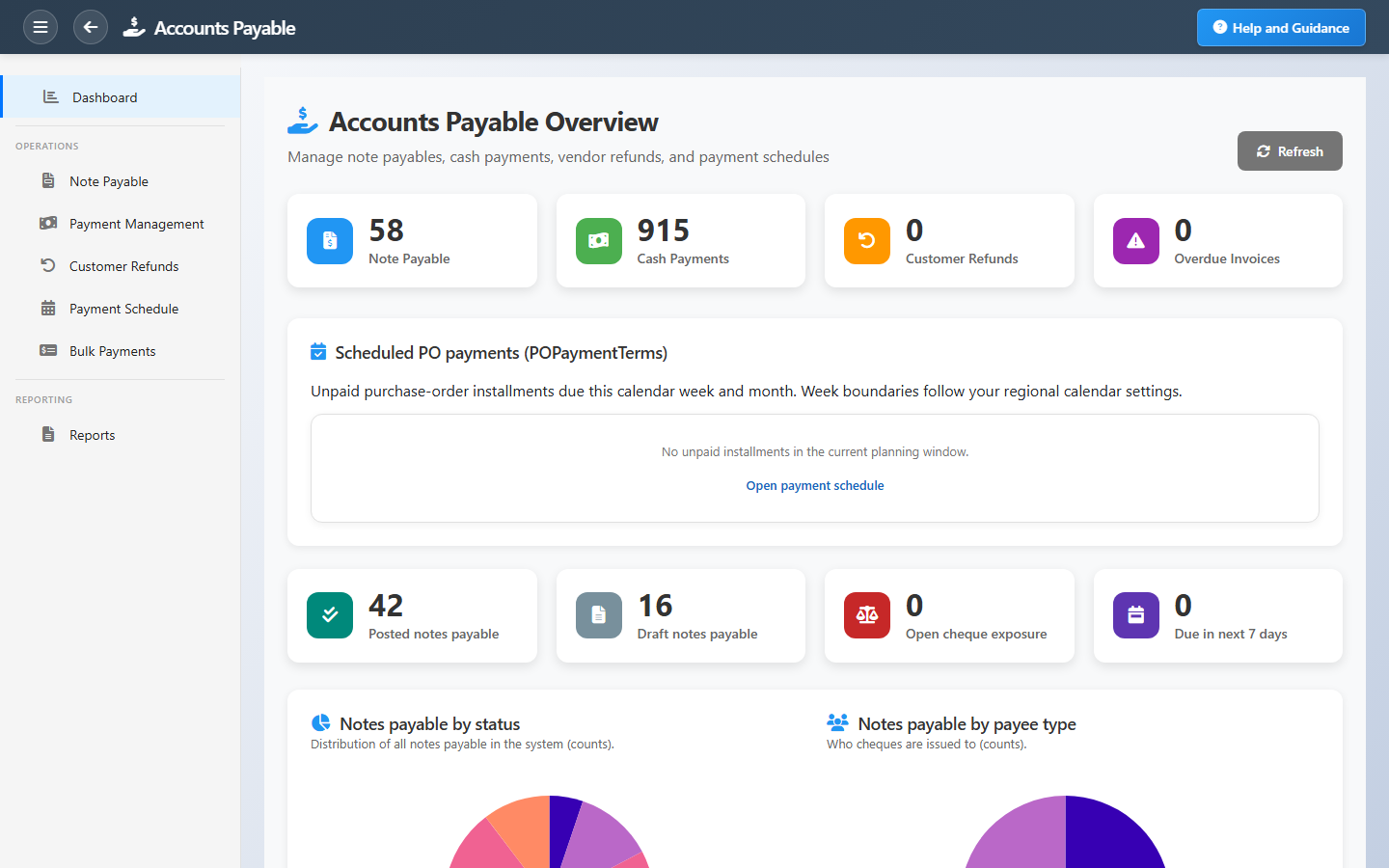
Accounts Payable shows exactly what you owe suppliers and when it is due. The dashboard highlights overdue notes, amounts due this week or month, and scheduled installments from purchase orders.
Record notes payable, process cash payments, handle customer refunds when needed, and use the payment schedule and bulk payment tools to plan outgoing cash without surprises.
Key Capabilities
Due date visibility
See overdue obligations and what is coming due in the next seven days at a glance.
PO payment schedule
Track unpaid purchase-order installments by week and month so procurement and treasury stay aligned.
Notes payable
Manage vendor obligations from draft through posted and paid with full status tracking.
Payment management
Record cash payments and clear open payables through a guided workflow.
Bulk payments
Process multiple payments efficiently when pay day arrives.
Payables aging
Reports by vendor, period, and aging bucket for month-end and supplier reviews.
Task Assignment Catalog
The Task Assignment Catalog connects workflow events in this module — documents submitted or approved, thresholds crossed, lifecycle handoffs — to the people who should act next. When an event fires, PerfectoERP assigns follow-up tasks, sends in-app notifications, or both, according to each catalog entry. Teams collaborate through My Desk instead of polling lists or chasing status in email.
Note payable submitted
Task assignment + notification
A note payable document was submitted for approval.
Default recipients
- Task → Accounts Payable Manager
- Notification → Accounts Payable (legacy clerk code)
Default routing is customizable per catalog entry — add job functions or individual users, or disable tasks or notifications in Configure.
Customer refund submitted
Task assignment + notification
A customer refund document was submitted for approval.
Default recipients
- Task → Accounts Payable Manager
- Notification → Accounts Receivable Manager
Default routing is customizable per catalog entry — add job functions or individual users, or disable tasks or notifications in Configure.
Cash payment voucher submitted
Task assignment + notification
A cash payment voucher was submitted for approval or posting. Review payee, amount, and GL distribution.
Default recipients
- Task → Accounts Payable Manager
- Notification → Banking Manager
Default routing is customizable per catalog entry — add job functions or individual users, or disable tasks or notifications in Configure.
Vendor payment installment due
Notification
A vendor payment schedule line is due within the alert window and is not marked paid.
Default recipients
- Notification → Accounts Payable Manager
Default routing is customizable per catalog entry — add job functions or individual users, or disable tasks or notifications in Configure.
Your cash payment was approved
Task assignment + notification
Your employee cash payment was fully approved. Review the voucher details.
Default recipients
- Task and notification → Employee payee on the document
Default routing is customizable per catalog entry — add job functions or individual users, or disable tasks or notifications in Configure.
Payment schedule created — review
Task assignment + notification
A vendor payment schedule was generated for a posted document. Review due dates and amounts in Payment Schedule.
Default recipients
- Task and notification → Accounts Payable Manager
Default routing is customizable per catalog entry — add job functions or individual users, or disable tasks or notifications in Configure.
Interface Showcase
Payables snapshot, scheduled PO payments, and shortcuts to pay or report.
Connected Modules
Purchasing
Purchase orders that drive payment schedules.
Banking
Bank accounts used for outgoing payments.
Vendors
Supplier profiles and payment history.
Ready to take control of payables?
Prioritize due dates, plan cash outflows, and pay with confidence using notes payable and payment management.