Purchasing
Run RFQs, compare vendor quotes, raise purchase requests with approvals, plan replenishment, and track receipts through to payables.
Smart Business Workflows
This module includes guided smart business workflows — multi-step runs with clear stages, review before commit, and audit-friendly history built for how your teams actually work.
Purchase Planner
Guided replenishment
The Purchase Planner (replenishment) turns reorder signals, min/max rules, and demand into concrete buying actions. Each run walks you from item selection through vendor assignment and receiving warehouse, then creates purchase requests or RFQs — routing to direct purchase only when an approved price exists.
Why teams use it
- Line-by-line control over what to buy, transfer internally, or skip
- Automatic RFQ vs purchase request based on approved vendor pricing
- Demand window and plan dates on the summary strip keep the run auditable
- Suggest or replace vendor from history to speed step two assignments
- One guided path from shortage on the shelf to documents buyers can execute
Overview
Purchasing covers the journey from need to receipt. Send RFQs to vendors, score responses in comparison views, raise purchase requests linked to projects or stock needs, and route them through approval before ordering.
The purchase planner suggests replenishment from safety stock and EOQ signals. A tracking board shows where requests sit in the pipeline; analytics highlight price trends, vendor performance, and late deliveries.
Key Capabilities
RFQs
Request quotes from multiple vendors on the same basket of items.
Quote comparison
Score responses before you award high-value lines.
Purchase requests
Document need with approval workflow and budget checks.
Purchase planner
Replenishment driven by min/max, EOQ, and stock signals.
Tracking board
Visual pipeline of open requests and orders.
Vendor returns
Return goods to suppliers with linked credit flows.
Task Assignment Catalog
The Task Assignment Catalog connects workflow events in this module — documents submitted or approved, thresholds crossed, lifecycle handoffs — to the people who should act next. When an event fires, PerfectoERP assigns follow-up tasks, sends in-app notifications, or both, according to each catalog entry. Teams collaborate through My Desk instead of polling lists or chasing status in email.
Purchase request submitted for approval
Task assignment + notification
A purchase request was submitted for approval. Review quantities, vendors, and budget before approving.
Default recipients
- Task → Purchasing Manager
- Notification → Purchase Request Responsible
Default routing is customizable per catalog entry — add job functions or individual users, or disable tasks or notifications in Configure.
Purchase request approved — proceed
Task assignment + notification
A purchase request was approved. Proceed with RFQ, purchase order, or fulfillment as needed.
Default recipients
- Task → Procurement Officer / Buyer
- Notification → Purchasing Manager
Default routing is customizable per catalog entry — add job functions or individual users, or disable tasks or notifications in Configure.
RFQ submitted for approval
Task assignment + notification
An RFQ was submitted for approval before sending to vendors.
Default recipients
- Task → Purchasing Manager
- Notification → RFQ Responsible
Default routing is customizable per catalog entry — add job functions or individual users, or disable tasks or notifications in Configure.
RFQ approved — publish to vendors
Task assignment + notification
An RFQ was approved. Publish or send it to vendors and collect responses.
Default recipients
- Task → RFQ Responsible
- Notification → Procurement Officer / Buyer
Default routing is customizable per catalog entry — add job functions or individual users, or disable tasks or notifications in Configure.
Vendor return order submitted
Task assignment + notification
A vendor return order was submitted for approval.
Default recipients
- Task → Vendor Return Responsible
- Notification → Purchasing Manager
Default routing is customizable per catalog entry — add job functions or individual users, or disable tasks or notifications in Configure.
Vendor return approved — ship stock
Task assignment + notification
A vendor return order was approved. Prepare and ship returned stock.
Default recipients
- Task → Warehouse Supervisor
- Notification → Accounts Payable Manager
Default routing is customizable per catalog entry — add job functions or individual users, or disable tasks or notifications in Configure.
Workflow revaluation submitted
Task assignment + notification
A workflow revaluation document was submitted for approval.
Default recipients
- Task → Purchasing Manager
- Notification → Accounts Payable Manager
Default routing is customizable per catalog entry — add job functions or individual users, or disable tasks or notifications in Configure.
Workflow revaluation approved
Task assignment + notification
A workflow revaluation was approved and posted or is ready to post.
Default recipients
- Task → Accounts Payable Manager
- Notification → Purchasing Manager
Default routing is customizable per catalog entry — add job functions or individual users, or disable tasks or notifications in Configure.
Vendor quote received on RFQ
Notification
A vendor submitted a quote on an RFQ. Review and compare before awarding.
Default recipients
- Notification → Purchasing Manager
Default routing is customizable per catalog entry — add job functions or individual users, or disable tasks or notifications in Configure.
Purchase request approved
Notification
A purchase request you raised was fully approved.
Default recipients
- Notification → Person who raised the request
Default routing is customizable per catalog entry — add job functions or individual users, or disable tasks or notifications in Configure.
Sales order approved — insufficient stock
Task assignment + notification
A Sales Order was approved while stock is insufficient on one or more lines. Create a purchase request or RFQ to source the missing quantity.
Default recipients
- Task and notification → Purchasing Manager
Default routing is customizable per catalog entry — add job functions or individual users, or disable tasks or notifications in Configure.
Interface Showcase
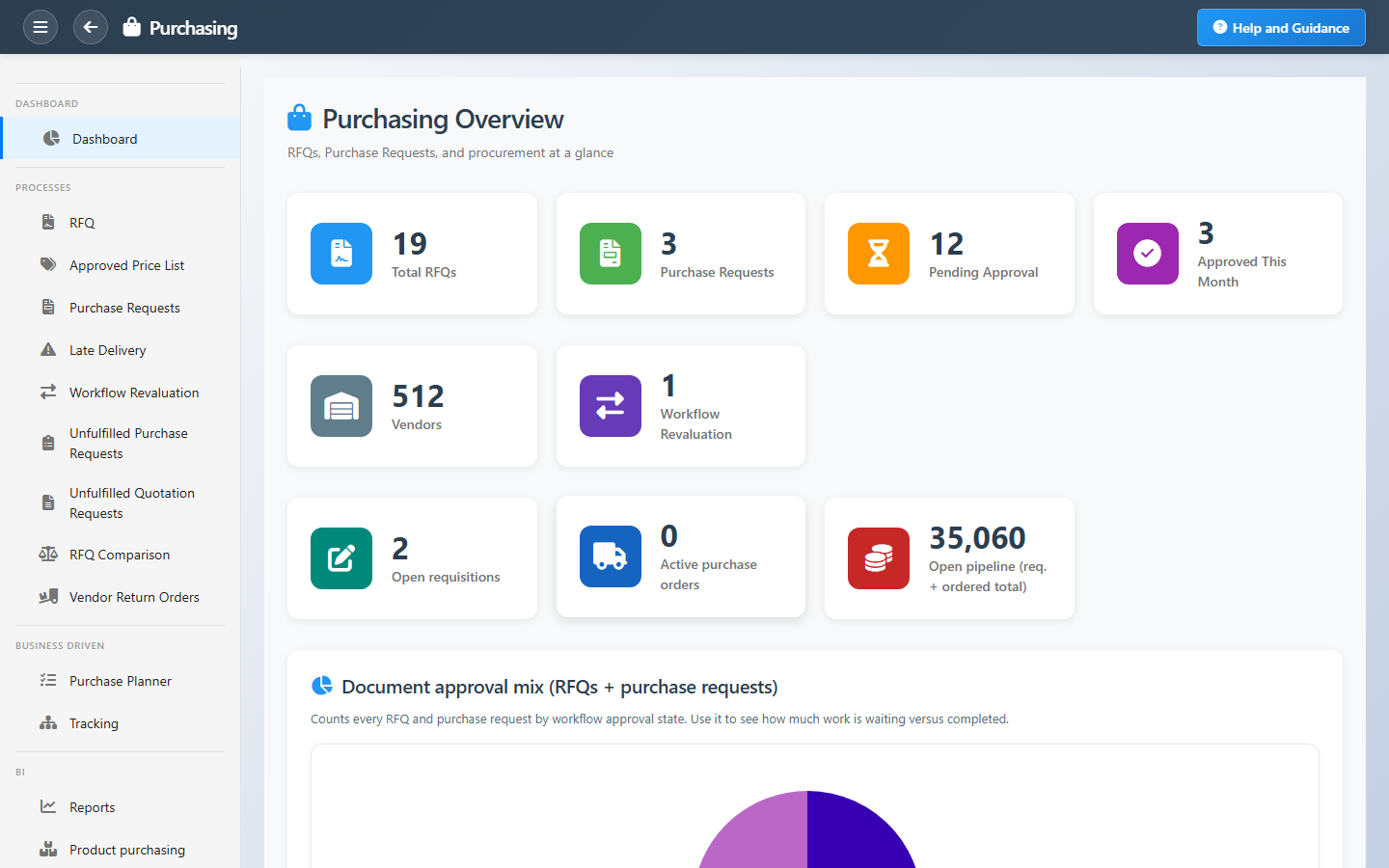
Open pipeline, RFQs, purchase requests, planner, and tracking.
Connected Modules
Vendors
Supplier master and scorecards.
Products
Item master for what you buy.
Inventory
Receipts that increase stock.
Accounts Payable
Pay after receipt and invoice.
Ready for disciplined procurement?
Award fairly after comparison, enforce approvals on spend, and see receipts hit inventory before you pay.